Type:
Fixed.
Summary:
This issue has been addressed in Encryptionizer versions 2501.1.7.50217. If you have a current support and maintenance plan, please download the latest version from your License Portal.
When attempting to install or activate Encryptionizer, you receive an error message:
“This implementation is not part of the Windows Platform FIPS validated cryptographic algorithms”
This message can result if the Local Security Policy: “System cryptography: Use FIPS compliant algorithms for encryption, hashing, and signing” is Enabled which conflicts with encoding of the software license.
This has no impact on Encryptionizer transparent data encryption cryptographic modules or drivers once configured.
Additional Information:
Our licensing module is using a hashing mechanism that does not use FIPS compliant methods. This is not related to security of your data, as data encryption uses FIPS Validated AES algorithms.
The issue involves a setting under Local Security Policy:
Security Settings > Local Policies > Security Options:
System cryptography: Use FIPS compliant algorithms for encryption, hashing, and signing setting
When set to Enabled, it can inactivate our software anytime one of the configuration utilities (graphical user interfaces) is used. This setting interferes with the encoding of the software licensing and you cannot proceed.
Once Encryptionizer is installed and configured, this option has no impact on the transparent encryption processing of encrypted databases, backups and files. Our cryptographic modules are FIPS 140-2 validated and use FIPS compliant algorithms.
Change the System Cryptography setting to Disabled permanently (see steps 1 – 4 below).
If you require this setting to be Enabled during regular processing, please follow the workaround steps below.
Workaround:
- Locate the System Cryptography setting (see image)
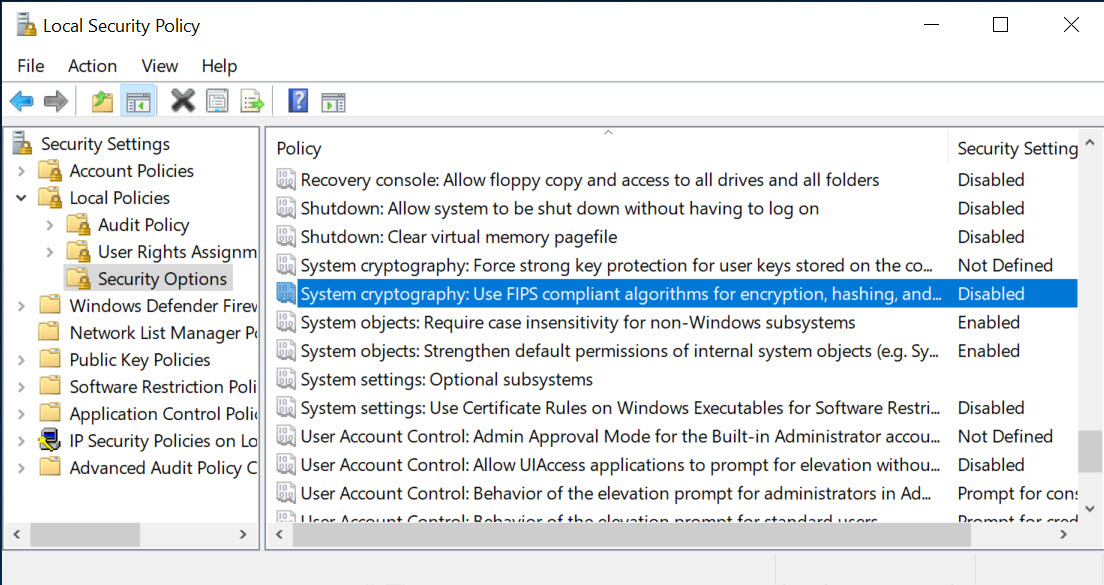
- Right click and choose Properties
- Select Disabled and click OK
- Reboot the machine
- Install and activate Encryptionizer.
- Perform your configuration of Encryptionizer: encrypt your sensitive data and secure your protected process.
- Once the encrypted data is being processed transparently through your secured service or application, you can change the System cryptograhy setting back to Enabled.
- If you wish to change configuration settings, you should change this setting to Disabled, perform your changes, and then reset to the Enabled.
NOTE:
If you have Enabled the System Cryptography option after installation, and run one of the configuration utilities, like the Main Menu, License Management, Encrypt/Decrypt Wizard or Administration Wizard, the software will be deactivated.
To resolve:
- Turn the System Cryptography option to Disabled and reboot (see steps 1-4 above)
- Run the License Management module to reactivate your software
- Perform your configuration changes
- Turn the System Cryptography option back to Enabled
- Reboot
If you have no activation lefts for your license, check your license portal to activate with a Temporary License in the interim, and then contact NetLib Security Support who can help to reenable your license activation.
CLI’s (bldcmd.exe, sectool.exe) are also not impacted by this setting and can be used to configure Encryptionizer.