Type:
Information
Summary:
Encryptionizer 2023 and later does not support operator passwords for utilities. Before you can upgrade to Encryptionizer 2023 or later, these operator passwords must be removed. See below for further instructions.
Additional Information:
Operator passwords were supported in Encryptionizer versions prior to product version 2201.1.1.0 (Encryptionizer 2023). These operator passwords limited which users could access the Encryptionizer User Interfaces, and could prevent casual tampering. Setting the operator password for a utility was optional. The operator password is not related to encryption keys. A user is not able to discover encryption keys or otherwise compromise encrypted data regardless of whether a user interface required an Operator Password. We have removed this feature as it was rarely used, and presented more frequent support issues than the feature solved. We recommend using Windows security settings by user or user group to prevent unauthorized users from executing utilities.
Since Encryptionizer 2023 and later does not support operator passwords, we prevent upgrades to the new version so that operator passwords are not eliminated without user acknowledgement.
To remove an operator password:
- Start the utility that is protected with an operator password, such as Administration Wizard.
- If an operator password is set, the utility will request that you enter the password:
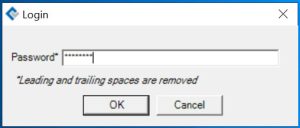
- Enter the correct password and the utility will display.
- Click Login in the upper right of the utility and a small pop-up menu appears:
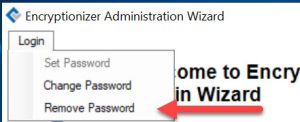
- Click Remove Password.
- Enter the original password to confirm removal.
- Utility will confirm that the operator password has been removed.
- Leave the utility by clicking Cancel on the lower left.
Operator Passwords could optionally be set on the following utilities. You can determine whether an operator password was set by running the utility.
- Administration Wizard
- Encrypt/Decrypt Wizard
- Set User Key Master Key (UKMK)
- Column Encryption Manager (if license supports this feature)
- Folder Protection (if license supports this feature)
- Encryptionizer Key Manager (if license supports this feature)
If you have trouble removing the Operator Password, please contact support via our support form: